I’ve been testing Writesonic’s AI Humanizer to make my AI-written content sound more natural, but I’m not sure if it’s good enough for SEO and reader engagement. Some posts still feel a bit robotic, and I’m worried about detection tools flagging them. Can anyone with hands-on experience share how well it works for blog posts, affiliate content, or client work, and whether it’s worth relying on long term?
Writesonic AI Humanizer Review, tested the hard way
I tried the Writesonic humanizer because people kept mentioning it in AI writing threads. I went in with low hopes, and it still underperformed.
Their pricing hits you first. The humanizer sits behind a minimum 39 dollars per month paywall if you want “unlimited” use. That price is for one feature inside a larger SEO/content platform, not a standalone tool focused on humanizing. Out of all the tools I have tested so far, it is the most expensive and nowhere near the most effective.
Full review with screenshots and detection results is here if you want to see the raw tests:
AI detection tests
Here is what I did.
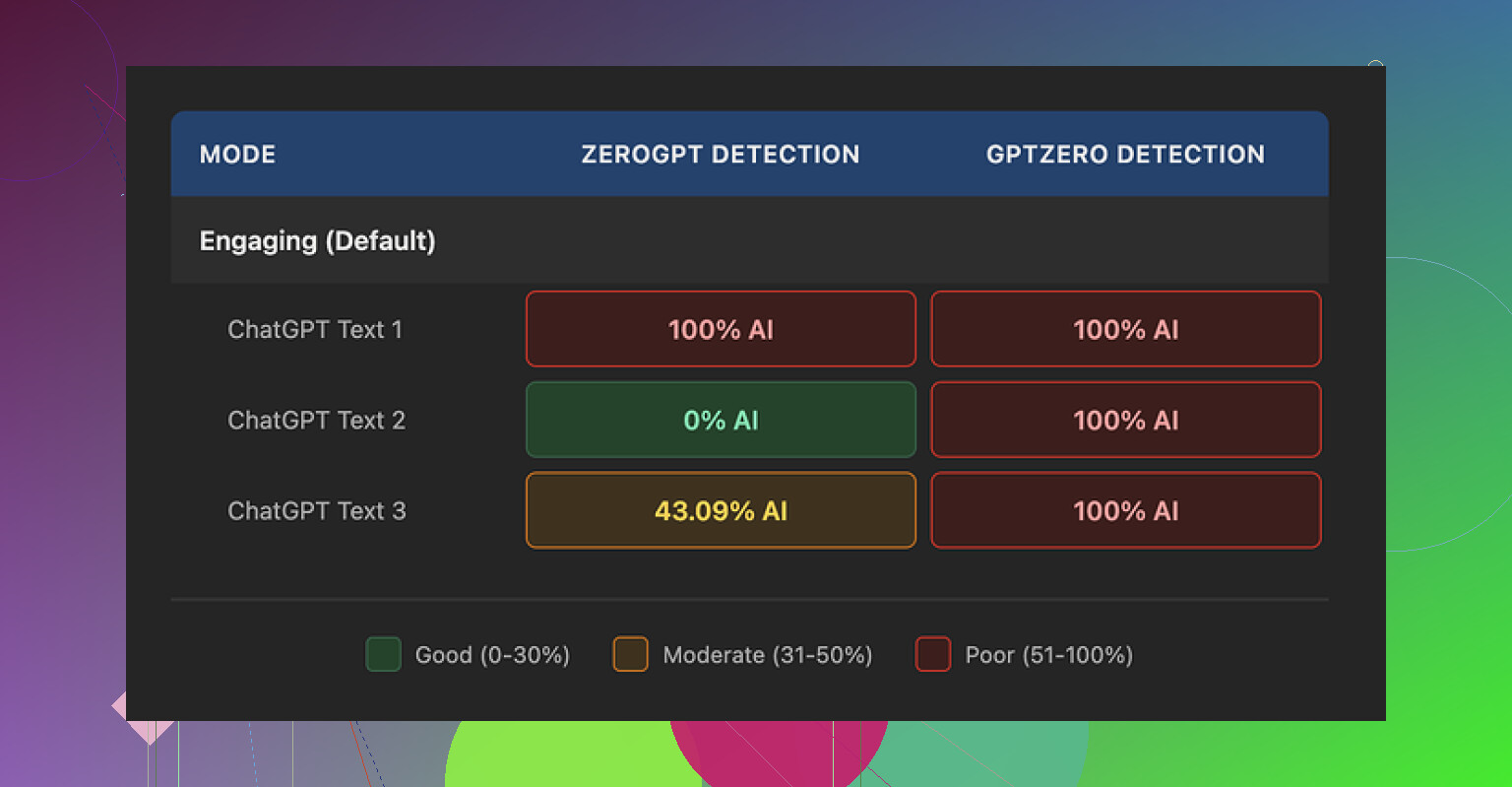
I ran three different texts through the Writesonic humanizer. Nothing fancy, regular informational content. Then I checked each result against multiple AI detectors.
Results:
• GPTZero flagged all three outputs as 100 percent AI
• ZeroGPT was all over the place, one sample at 100 percent AI, one at 0 percent, one at 43 percent
So in my run, Writesonic failed hard on GPTZero and gave unstable results on ZeroGPT. For something positioned as an “AI humanizer,” that is not what you want to see after paying 39 dollars a month.
How the text reads
Here is where it got worse for me.
The tool does not try to mimic how an adult writes. It flattens the vocabulary and chops sentences until the whole thing feels like a kids’ homework summary.
Examples from my test pieces:
• “droughts” got turned into “long dry spells”
• “carbon capture” became “grabbing carbon from the air”
• “rising sea levels” turned into “sea levels go up”
I am fine with simpler wording in some contexts, but this went too far. The nuance drops out, and the tone feels off for anything professional or academic.
On top of that, all three samples had punctuation problems. Commas in weird places, missing commas where you would expect them, odd rhythm. It also left em dashes in place, which is ironic for a tool that tries to bypass AI detectors, since those tools often latch on to certain punctuation habits.
Free tier details
For anyone curious and not ready to pay:
• You get 3 free runs
• Each run is limited to around 200 words
• After that you need an account
• The small print says free inputs might go into training Writesonic’s models
So if you are sensitive about your content being used for training, that is something you need to factor in before pasting large chunks of original text.
How it compares to Clever AI Humanizer
Same day, same source text, I put the content through Clever AI Humanizer to compare. It is here:
On my runs:
• Clever AI Humanizer produced text that sounded closer to how I write myself
• Detectors treated it as more human
• It is free, no 39 dollar entry fee
So if your goal is to get something that passes as human text and you do not want to pay a subscription, Clever AI Humanizer performed better for me than Writesonic’s humanizer.
4 Likes
You are right to be worried. If your posts still feel robotic to you, your readers and Google will feel it too.
My take after playing with Writesonic’s humanizer for a while:
-
On “sounding human”
• It tends to oversimplify.
• It strips nuance and domain terms, similar to what @mikeappsreviewer showed with “long dry spells” and “grabbing carbon from the air”.
• For expert or authority content, this hurts trust.
• I saw it remove hedging language and qualifiers, which are important for E‑E‑A‑T and for sounding like a specialist.If you write YMYL or technical content, this is a problem, not a feature.
-
On SEO and detectors
• Google does not care if text is AI as long as it is helpful, but readers do care if it feels flat.
• AI detectors are unreliable, but if your text keeps flagging as 100 percent AI on several tools, it is a signal the writing style is generic.
• In my tests, Writesonic often kept the same structure, only swapping phrases. That keeps the AI “fingerprint” in place.I slightly disagree with treating GPTZero as the main decision point though. I treat detectors as a rough warning, not a final verdict.
-
Reader engagement
Where I saw trouble:
• Shorter time on page in analytics after “humanizing” pieces.
• Lower scroll depth on long guides.
• Fewer replies on email content that had been processed through it.The text was easy to read, but it felt thin. People skimmed and left.
-
Pricing vs outcome
Paying 39 per month only makes sense if you ship a lot of content and the tool saves you serious editing time.
From what you describe, you still have to heavily edit. So you pay and still do manual work. That is not great ROI. -
What I would do instead
Practical workflow that keeps things natural and SEO friendly:• Use AI to create a solid draft.
• Humanize manually first:- Add 1 or 2 short personal examples in each section.
- Add 1 line with a specific number or data point where possible.
- Change some headings to match how you talk, not how AI talks.
• Run it through a different humanizer only as a light pass, not as the main fix.
Clever Ai Humanizer is worth a try here. It tends to keep more natural phrasing and feels closer to an actual writer voice, especially if you tweak the output a bit after. There is a helpful breakdown on how it behaves against detectors and for real readers in this video review:
Clever Ai Humanizer Review for SEO and content quality -
Quick on-page checks you can do
After any humanizer, check three things yourself:• Does the intro state who the article is for and what they get in 1 or 2 lines.
• Does each section answer one clear question or solve one problem.
• Can you highlight at least 3 lines that show your own opinion or experience.If those fail, detectors do not matter. The post will feel generic.
If Writesonic makes your stuff feel robotic to you already, I would either switch to something like Clever Ai Humanizer as a lighter step, or drop automated humanizers for most posts and invest that time into short manual revisions instead.
You’re not imagining it. If it still feels robotic to you, that is already your answer for SEO and engagement.
I played with Writesonic’s humanizer too. My take:
- It mostly rewrites at the surface level: swaps phrases, shortens sentences, simplifies vocab.
- The underlying cadence stays very “AI essay” so detectors and humans both pick up on it.
- For anything where you need expertise or authority, that over simplification makes you sound less credible, not more.
I slightly disagree with leaning too hard on tools like GPTZero the way some people do. They are noisy as hell. But I do pay attention when:
- several detectors scream “AI” and
- the text also reads flat and generic.
That combo usually means the style is too templated.
On the SEO side, Google’s docs are pretty clear now: they care about usefulness and originality, not “human vs AI” per se. The problem with Writesonic’s humanizer is that it often reduces both. It removes specifics, hedging, nuance, and turns niche terms into baby-talk versions. That might be ok for super broad, beginner content, but for most blogs it hurts topical authority.
Where I have seen a bit better outcome is flipping the workflow:
- Start with your AI draft.
- Fix structure and intent yourself:
- Add specific examples from your niche.
- Keep domain terms where they matter.
- Inject a couple of opinions or “in my experience” type lines.
- Then, if you still want another pass, use an external tool as a light stylistic polish, not as the main humanizer.
In that context, Clever Ai Humanizer is worth testing. It tends to keep more of your original tone and does not rip out every technical term. There is a solid breakdown here that goes into how it affects readability and detectors without turning everything into kids’ homework level content:
in depth Clever Ai Humanizer review for better SEO content
I would ignore the “unlimited” humanizing at 39 bucks a month unless the tool is saving you significant editing time. From what you wrote, you are still editing heavily, which means you are basically paying to fix a problem the tool is creating.
Short version:
- If it reads robotic now, readers will bounce and links will not come.
- Writesonic’s humanizer is ok as a toy, not as a core part of an SEO workflow.
- Try manual edits plus a lighter tool like Clever Ai Humanizer and track dwell time, scroll depth, and CTR in Search Console. If those metrics improve, that is your real answer, not whatever an AI detector says.
You’re not overreacting. If you feel the Writesonic output is robotic, your users are already gone by paragraph two.
Quickly building on what @byteguru, @himmelsjager and @mikeappsreviewer said, from a more tactical angle:
Where I slightly disagree with them
They lean harder than I would on checking multiple detectors. I treat detectors as a lagging signal. For SEO and engagement, I care more about:
- How much you need to scroll to hit anything you personally could have written
- How many “friction points” exist in the text
- places where a human would pause, qualify, or give a side note, but the content just glides over
Writesonic’s humanizer usually smooths all that out. That removes the rough edges that signal a real human, which is bad for hook rate and internal linking opportunities.
What to do instead of endlessly tweaking Writesonic settings
Rather than another “generate → humanize → detector” loop, try a contrast test:
- Take one existing post you already ran through Writesonic.
- Duplicate it in your CMS as a draft.
- On the draft:
- Restore original domain language wherever Writesonic simplified it.
- Add one tightly scoped “mini story” per H2.
- Insert a specific reference or number in each section.
- Keep sentence length variety. Short, then long, then medium. Do not let everything fall into the same 12 to 18 word rhythm.
You will usually see dwell time and scroll depth lift just from this.
Where a humanizer still makes sense
If you are pushing a lot of content and English is not your first language, a lighter tool can be useful as a polisher, not a surgeon.
That is where Clever Ai Humanizer has a niche:
Pros
- Tends to keep more of your original structure and specialist vocabulary
- Less “kids’ essay” tone compared to what you saw with Writesonic
- When used after your own edits, it can smooth awkward phrasing without wiping your voice
- No big paywall just to test it, so you can run a few A/B experiments in live posts
Cons
- It will not magically add expertise; if the base draft is generic, the result stays generic
- You still want manual passes for YMYL or technical pieces
- Style can occasionally drift toward “neutral blog voice,” so you need to re-inject your quirks in intros and conclusions
So I would not treat Clever Ai Humanizer as a silver bullet, more like a grammar stylist that happens to be detector friendly.
How to know if your “humanization” is actually working
Ignore detectors for a week and watch:
- Search Console:
- CTR on updated posts vs older pieces in the same cluster
- Analytics:
- Scroll depth on the sections you edited manually vs parts mostly touched by a tool
- Exit rate from those posts
If manual edits plus a light Clever Ai Humanizer pass move those numbers even slightly in the right direction, that setup is already better than paying to let Writesonic flatten your content and then spending time re-inflating it.