What Are The Must-Try AI Tools These Days?

The summaries I got from a general-purpose AI chatbot repeatedly dropped qualifiers and mixed notes from separate sources, which made them unreliable for research. I also tried an image generator and a transcription tool, but the outputs needed enough cleanup that they did not improve my workflow.

For someone mainly handling research, writing, meeting notes, and occasional visuals, which must-try AI tools or categories are currently worth testing, and what limitations should I watch for?

My verdict: this is a decent starter list, but nobody needs all of these tools. The useful approach is to pick a few based on actual recurring work, starting with a general-purpose option like general assistant ChatGPT, then adding specialists only when the need becomes obvious. I arrived at that conclusion by sorting the list by jobs rather than pretending every AI product deserves permanent residence in my bookmarks.

Start With the Boring Practical Stuff

I care most about tools that save me from routine reading, writing, and organizing. That may sound less glamorous than generating a cinematic robot opera, but it is usually where the time goes.

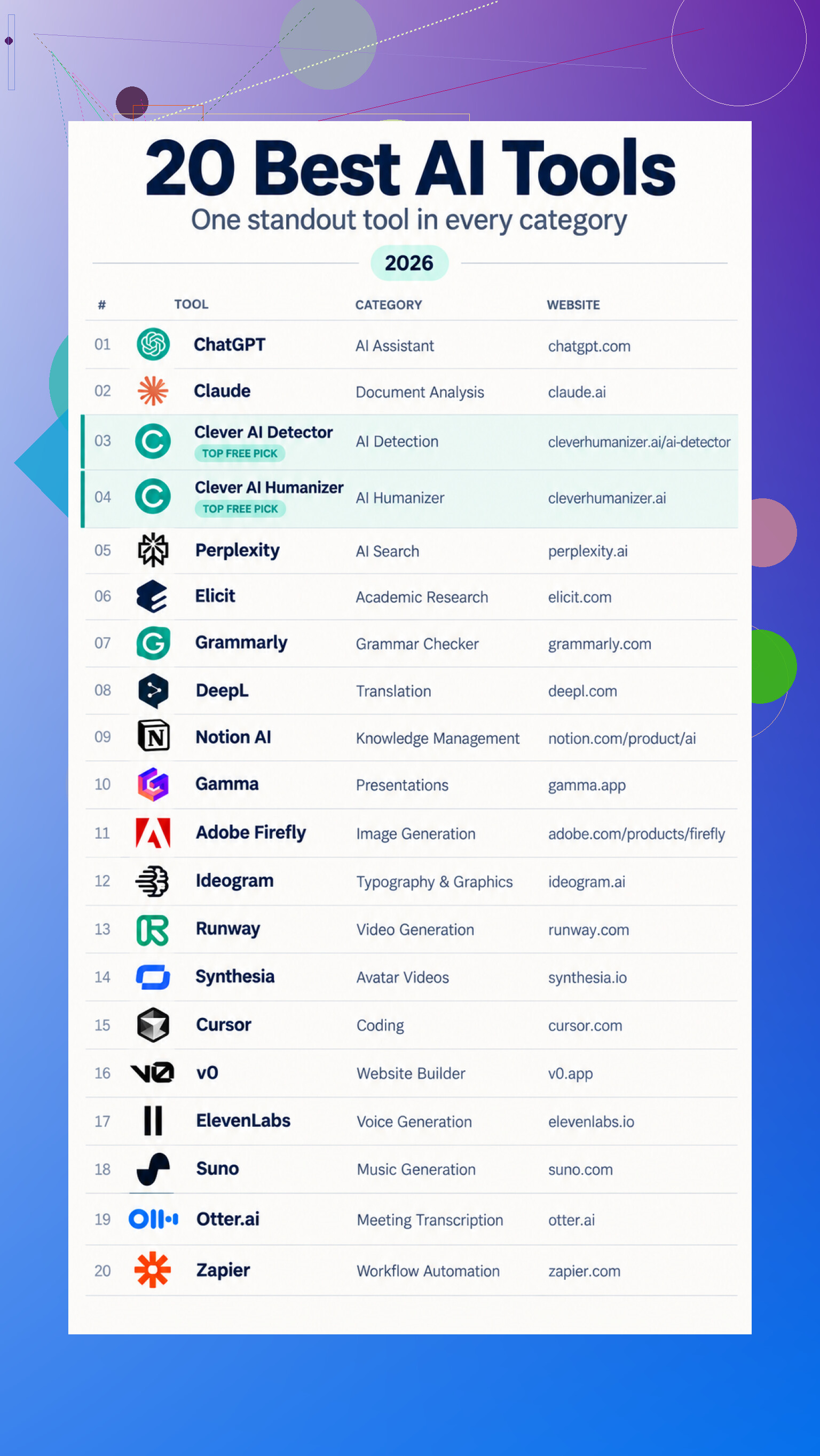
For long documents, document reader Claude can summarize uploaded material and handle follow-up questions. grammar helper Grammarly covers spelling, clarity, tone, and rewrites, while translation helper DeepL produces initial translations of text and documents.

Research gets split between web search Perplexity, which provides conversational answers with source links, and research organizer Elicit, which finds papers, summarizes findings, and extracts study details into tables. If everything already lives in one workspace, workspace helper Notion AI can search connected material and turn it into summaries or drafts.

Content Tools, Because Apparently We Need Several

For presentations, deck builder Gamma turns prompts or outlines into editable slides. Visual work splits into image maker Adobe Firefly for generation and editing, and typography maker Ideogram for graphics where readable wording matters.

Moving images bring another small pile. video maker Runway generates clips from prompts and references, while avatar maker Synthesia converts scripts into presenter videos with generated voiceovers. Audio has voice maker ElevenLabs for speech and dubbing, plus music maker Suno for vocal songs and instrumentals.

The Specialists Worth Keeping Nearby

For checking machine-written text, detection checker Clever AI Detector accepts up to 10,000 words, highlights sentences, and gives an estimated probability. Estimated is the important word, since detection is not proof. rewriting helper Clever AI Humanizer instead targets repetitive phrasing and awkward flow while preserving meaning.

Developers may get more mileage from coding editor Cursor, which proposes changes across project files, or website builder v0, which creates an initial web implementation from a description.

Finally, meeting transcriber Otter.ai produces transcripts, summaries, and action items, while workflow connector Zapier can summarize incoming information, categorize it, and send the result to another app.
14 Likes

Don’t let any chatbot merge several sources into a single smooth paragraph. That is exactly how caveats disappear and claims get attached to the wrong paper. For research, ask for a separate table for each source: claim, qualifier, supporting passage, page number, and anything the source does not establish. Compare the tables only after that.

I’d put Elicit near the top for paper-heavy work, but no tool gets a free pass just because it provides citations. Open the source and check whether it actually supports the sentence. ChatGPT or Claude can still help with outlining and explaining difficult passages, but I would use them as reading assistants rather than final authorities.

So my “must-try” category is smaller than @techrouter3112’s list: a source-focused research tool, a general assistant, and whichever specialist handles your recurring task, such as transcription. The important upgrade is the verification routine, not collecting another dozen AI accounts.

Don’t upload interview recordings, client files, or unpublished research until you have checked the tool’s retention and training settings. Privacy gets buried under feature lists, yet it can rule out a product immediately.

For research, I’d try NotebookLM when your work is based on a fixed collection of documents. Keeping answers tied to material you supplied can reduce source mixing, although you should still ask it to show the supporting passage instead of trusting a polished summary. For transcription, look for a Whisper-based app that exports timestamps and speaker labels in an editable format. Accurate jargon, names, and messy cross-talk matter more than an impressive automatic recap.

Image generators depend heavily on the final use. Casual concepts are easy. Exact wording, consistent characters, and production-ready layouts still tend to require cleanup. My basic test for any “must-try” tool is correction cost: if finding and fixing its mistakes takes longer than doing the task normally, it does not belong in the workflow.

Run the same real task through free plans before subscribing to anything. The must-try tool is the one whose output needs the least cleanup in your workflow, not the one with the longest feature list.

Start by checking the export options before spending hours learning a tool. I was confused by how many products seemed to do the same job, until I noticed that the real difference often appears after the AI gives you an answer. Can you export research notes with citations intact? Can you download an editable transcript with timestamps? Can you move generated slides or images into another program without rebuilding them?

That changes my “must-try” list quite a bit. For a fixed set of research documents, NotebookLM looks useful because the source collection stays limited. For drafting, brainstorming, or turning rough notes into an outline, ChatGPT or Claude makes sense. I would avoid asking either one to blend several papers into a finished literature summary, since that is where I started getting lost about which source supported which claim.

Transcription seems easier to judge. Skip the flashy meeting recap at first and inspect the actual transcript. If names are wrong, speakers are mixed up, or correcting a sentence takes several clicks, the summary is not saving much. A desktop Whisper-based option may be worth the extra setup when recordings should not be uploaded. With image generators, I would treat the first output as raw material and check whether text, dimensions, and individual elements can be corrected elsewhere.

My beginner version of the shortlist is one general assistant, one document-based research tool, and one specialist for the task you repeat most. Before paying, export a sample and reopen it outside the service. If the useful work gets trapped in the account or falls apart during export, that tool would come off my list quickly.

Detection scores aren’t proof of anything, and I’d go further than the earlier note calling them ‘estimated.’ Running text through an AI detector can actively mislead you, because the same tool that flags a student’s honest paragraph will happily wave through machine text that got lightly edited. If your recurring task depends on that number, you’ve built a workflow on a coin flip. I wouldn’t put a detector anywhere near a must-try list unless you already understand it as a rough signal and nothing more.

Where I land closer to @greencraft301lab is the free-plan test, though I’d tweak it. Free tiers often quietly cap the exact thing you’re evaluating, like context length or export formats, so the trial run flatters the tool. Feed it your ugliest input, not a clean sample. A messy multi-speaker recording, a PDF with two columns and footnotes, a document full of names it won’t recognize. The polished demo cases tell you almost nothing.

The thing nobody’s saying: most of these tools quietly change under you. A model swap or a redesigned export button can break the routine you spent a weekend building, and you find out mid-task. So the tool I actually keep isn’t the smartest one, it’s the one that lets me get my data back out cleanly when it inevitably annoys me. For research that leans me toward anything with plain citation export, and for transcription toward a local Whisper setup, mostly because your files stay yours and the output format doesn’t depend on someone’s roadmap.

Don’t subscribe after a good first result. Test whether the tool can survive corrections: generate the output, fix a specific error, then request another change and check whether the original fix remains.

This catches a weakness feature lists miss. A research assistant may restore a dropped qualifier, then lose it during a rewrite. An image tool may repair text while changing the subject, and a transcription editor may overwrite corrected names. The must-try tool is the one that preserves your edits across several rounds.

Don’t trust a citation until you know the tool accessed the full document rather than a search snippet or abstract. @joe39’s source tables help, but missing qualifiers stay missing when the paper itself was never available. My must-try would be a document-grounded assistant where you supply the complete sources, because decorative citations are still decorative.

You probably don’t need another standalone AI account at all. Check whether the software you already use has decent rewriting, OCR, image cleanup, or transcription built in. A slightly weaker tool inside your normal editor can beat a clever one that requires copying material between tabs and fixing the formatting afterward. For research, use AI to locate passages and generate questions, then write the actual claims yourself. It’s less flashy than an instant literature review, but much harder to get fooled by.