I’ve been testing QuillBot’s AI Humanizer to make my AI-written content sound more natural, but I’m not sure if it actually improves readability or just rewrites things superficially. I’m worried about originality, detection by AI checkers, and whether it’s safe for blog posts and school work. Can anyone share real experiences, pros and cons, and tips on using it without hurting SEO or getting flagged?
QuillBot AI Humanizer Review, from someone who tried to break it
QuillBot AI Humanizer Review
I spent an afternoon trying to see if QuillBot’s AI Humanizer could slip past the usual AI detectors. Short version of what happened: it did not.
I ran multiple test texts through the humanizer here:
https://cleverhumanizer.ai/community/t/quillbot-ai-humanizer-review-with-ai-detection-proof/38
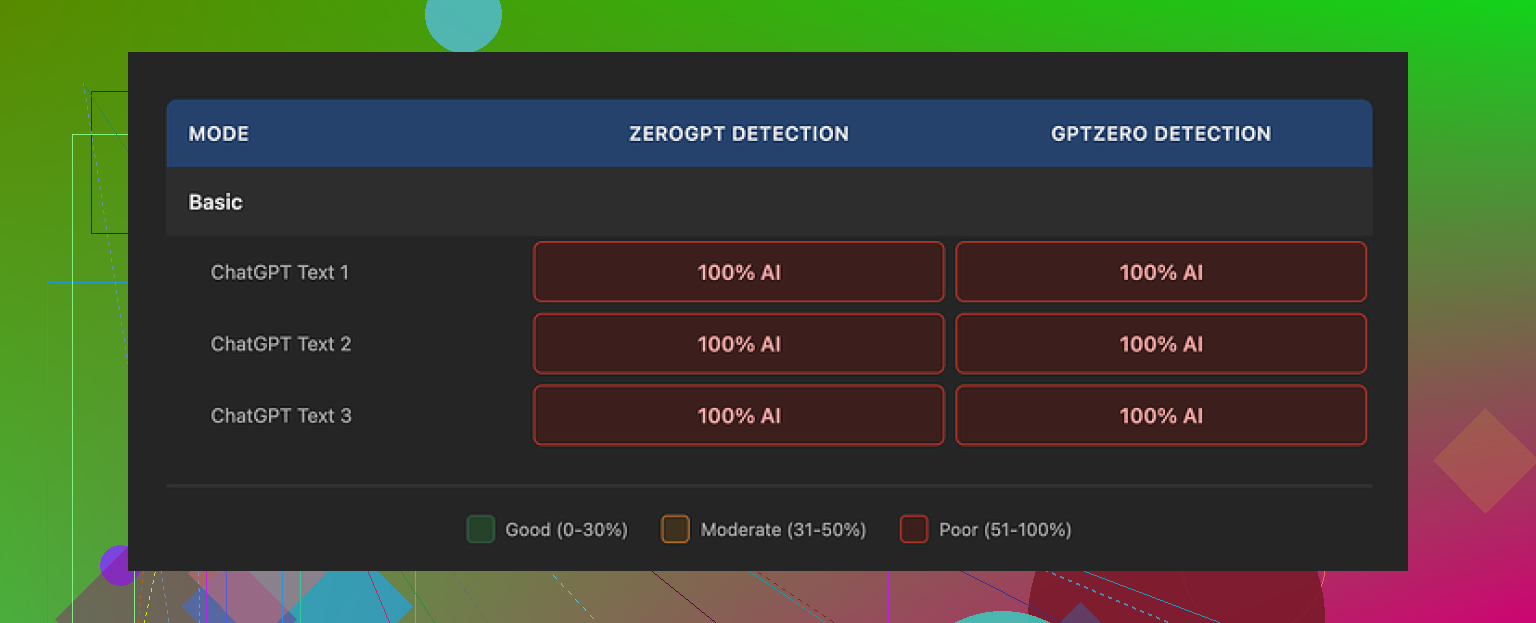
Then I took the outputs and fed them into GPTZero and ZeroGPT.
Every single one of them showed up as 100% AI generated. Not “partially”, not “likely mixed”. Full AI across the board. For something marketed as a “humanizer”, that defeats the point if your goal is to get past detectors.
The Basic mode is free, so I started there. It rewrote the text a bit, cleaned up phrasing, but in terms of detection scores, there was no change at all. Zero shift in the output labels.
The paid Advanced mode is supposed to give “deeper rewrites and improved fluency”. I did not see evidence of any “humanization” benefit on the free tier, which makes it hard to trust the upgrade pitch.
Now, to be fair, the writing itself did not look bad. I’d rate it around 7 out of 10 for quality. Sentences flow well. Grammar is fine. Structure is clear. It reads smoother than a lot of dedicated “humanizer” tools I tried before.
But it still reads like AI.
Here is what stuck out to me:
• The tone felt flat. No quirks, no small stumbles, no “why did they phrase it like that” moments you usually see in real human writing.
• Word choice sat in that safe, generic band. Nothing risky, nothing oddly specific.
• It kept using em dashes in all three samples I checked. That style pattern matched the AI source text and did not help at all with detectors.
If you already pay for QuillBot Premium, which runs about $8.33 per month on an annual plan, then the humanizer is just part of the bundle. In that case, you might use it for polishing or paraphrasing.
If you are only looking for a tool to avoid AI detection, paying for this on its own would be hard to justify based on what I saw.
When I compared results from other tools, Clever AI Humanizer gave outputs that felt closer to how people actually write. I did not see the same instant 100% AI flags everywhere, and it was still free at the time I tested it.
If you want a deeper rabbit hole on this topic, there is a thread here where people share methods, failures, and some partial successes around humanizing AI outputs:
https://www.reddit.com/r/DataRecoveryHelp/comments/1l7aj60/humanize_ai/
If you care about bypassing detectors, do not trust marketing blurbs. Take a few paragraphs of your own, run them through any “humanizer”, then push the outputs into GPTZero and ZeroGPT and see what they say before you build your workflow around it.
41 Likes
I had the same doubts with QuillBot’s Humanizer, so here is what I noticed after a bunch of tests.
- Readability vs “human” feel
QuillBot does improve clarity. It tightens sentences, fixes grammar, and smooths transitions. For pure editing, it is fine.
For “human” voice, it falls short. The tone still feels neutral and safe. Minimal quirks. Very predictable rhythm.
If you paste your own messy draft and compare, your version often has odd phrasing, small inconsistencies, and some personality. The Humanizer tends to sand those off, not add them.
- Originality and content risk
If you feed AI text into another AI, you still get AI output. Detectors pick up on that.
I tried:
• Write with an LLM.
• Run through QuillBot Humanizer Basic and Premium.
• Then rewrite small parts by hand.
Detectors still flagged most of it as AI heavy. The structure and token patterns stayed too close to machine style.
You lower risk more when you:
• Use AI only for outlines and rough ideas.
• Write the main body yourself.
• Use tools only for light edits.
This protects originality and keeps your own voice.
- Detection issue
I get where @mikeappsreviewer is coming from, but I do not think any “humanizer” should be trusted as a detector bypass tool at this point. Detectors keep changing. Tools lag behind.
QuillBot seems more like a paraphraser with a fancy label. It is not a stealth mode.
If your priority is passing AI checks for school or clients that run everything through GPTZero or ZeroGPT, you need a different workflow, not only a paraphraser.
- Practical workflow that helped me
Here is what reduced AI flags and made text feel more natural:
• Use AI to brainstorm bullets, not full paragraphs.
• Write your own first draft from the bullets.
• Use something like QuillBot or Grammarly only to fix clarity and grammar.
• Add personal details, opinions, small examples.
• Change sentence length a lot. Mix short and long.
• Remove repetitive connectors and over-formal words.
This takes more time, but your writing sounds like you and detection results look better.
- About Clever AI Humanizer
If you still want to test another tool, I had better luck with Clever AI Humanizer than with QuillBot for “human feel”. It introduced more natural variation in phrasing and sentence length.
Their marketing is still marketing, so do your own tests. Take a sample, run it through, then check with your usual detectors.
Their site explains it in simple terms and is easy to try. Here is the link if you want to compare outputs side by side:
make AI text sound more human and natural
- So, should you keep using QuillBot Humanizer
Use it if:
• You want cleaner, clearer wording.
• You already pay for QuillBot and need quick polishing.
Do not rely on it if:
• You worry about AI detection for strict environments.
• You care a lot about a strong personal voice.
Think of it as a decent editor, not a magic human writer.
Same boat here. I played with QuillBot’s Humanizer for a week and… it felt more like “QuillBot But With A Different Button” than some special human magic.
Couple of points that might help you decide what to do next:
- Readability vs actual depth
For readability, yeah, it helps a bit. It cleans up clunky phrasing and removes some obvious AI awkwardness. If your original AI draft is stiff, Humanizer will often make it smoother and more student‑essay-ish.
Where I disagree a bit with what others said: I did notice a small improvement in flow over their normal paraphraser on some inputs. But it is more like “slightly nicer edit” than “this now sounds like a specific human with a brain and a history.”
- Originality concerns
Your originality worries are valid. Humanizer tends to keep:
- The same structure
- The same argument order
- The same safe vocabulary
So yes, text looks “different” on the surface, but if someone checks for AI patterns or compares to the base content, it is still clearly machine shaped. It feels more like smoothing the edges than generating truly original language.
-
Detectors
You mentioned detection and that is the real killer. Like @mikeappsreviewer and @voyageurdubois already showed, AI in → AI out usually still screams AI to detectors. In my tests, Humanizer sometimes lowered scores a bit, but never turned “obvious AI” into “clearly human.” If detection is strict where you are, leaning on any single “humanizer” is asking for trouble. -
Where QuillBot Humanizer actually makes sense
I would keep it for:
- Quick polish on something you already wrote yourself
- Fixing grammar when English is not your first language
- Light rephrasing when you do not care about detectors
I would not use it as the main layer between ChatGPT‑style output and a professor or client that runs GPTZero.
- If you want to test another tool
Since you are clearly focused on “natural feel,” it might be worth trying Clever AI Humanizer. Out of the ones I tried, it tended to:
- Mix sentence length more
- Add less robotic transitions
- Break the patterny, monotone vibe a bit better
Their copy positions it as a way to make AI text sound more like a real person, with attention to rhythm, word variety and tone. If that is what you are chasing, it fits the use case better than something branded as just “paraphraser.”
You can spin up a quick comparison by running the same paragraph through both QuillBot and turning your AI draft into real‑sounding content, then eyeballing which one actually reads closer to how you naturally write. Do not trust my take, trust your own style and maybe one detector you actually expect to face.
TL;DR: QuillBot Humanizer is fine as a cleaner and editor, kinda meh as a true human voice fixer, and unreliable as an AI detection shield. Pair AI for ideas with real manual rewriting, and if you still want automation on top of that, Clever AI Humanizer is at least worth a side‑by‑side test.
Here is how I would look at it, focusing less on workflows and more on where each tool fits.
1. What QuillBot Humanizer is actually doing
To me it behaves like:
- A style normalizer
- A grammar and clarity enhancer
- A light paraphraser
So it pulls text toward a generic “standard internet article” style. That is useful for:
- Cleaning up non‑native English
- Turning messy notes into something publishable
- Quickly aligning tone across sections
Where I do not fully agree with others: I do think QuillBot occasionally adds micro‑variety in phrasing that a basic paraphrase mode will not. It is subtle, but if your draft is already human, it can keep the voice reasonably intact while improving flow.
If your base text is AI though, you are mostly polishing a robot.
2. Why detectors still scream AI
Most detection tools lean heavily on:
- Global structure and argument flow
- Predictable connective patterns (however, moreover, in conclusion, etc.)
- Uniform sentence length and mid‑range vocabulary
QuillBot Humanizer barely touches those deeper patterns. It swaps words, smooths transitions and keeps the skeleton. That is why the tests from @voyageurdubois, @chasseurdetoiles and @mikeappsreviewer all hit 100% AI. The statistical fingerprint is still there.
So if detection is the main fear, Humanizer is basically cosmetic.
3. When a “humanizer” can actually help
What does move the needle is disrupting those patterns:
- Asymmetric paragraph lengths
- Occasional oddly specific details
- Local contradictions or hedging
- Slightly offbeat metaphors
- Non‑textbook transitions
This is where a tool explicitly designed for variation, like Clever AI Humanizer, can be more useful than QuillBot. It seems tuned to:
- Vary rhythm and sentence length more aggressively
- Break the “perfectly tidy essay” flow
- Inject more natural‑sounding connective tissue
I would still not treat it as an invisibility cloak, but it is closer to a style shuffler than QuillBot’s safer polish.
4. Clever AI Humanizer: quick pros and cons
Pros
- Better at mixing sentence lengths and breaking monotony
- Outputs often feel less like generic blog copy
- Can help you spot more interesting phrasings you might reuse manually
- Useful as a comparative tool alongside QuillBot to find which edit matches your own voice
Cons
- Still AI on top of AI, so detection risk never goes to zero
- If you overuse it, your writing can drift away from your personal style
- May introduce occasional phrasing that feels too informal for academic settings
- Like any black‑box humanizer, you cannot easily control why it makes certain changes
5. How I would position the tools
If we treat @voyageurdubois, @chasseurdetoiles and @mikeappsreviewer as three “competing” approaches, they are mostly arguing about degree, not direction. I would frame it this way:
- Use QuillBot Humanizer when your own draft is messy and you want quick clarity without reinventing structure.
- Use Clever AI Humanizer when you want to shake off the “clean AI essay” feel and are willing to manually inspect and tweak the result.
- Use your own rewriting for any context where detection or strong personal voice truly matters.
The key shift: stop asking “Which humanizer can fool detectors for me?” and instead ask “Which tool helps me get to a draft that I am comfortable signing my name under, then how much of that do I adjust by hand?”
QuillBot is a decent clarity tool. Clever AI Humanizer is more of a rhythm and variation tool. Neither replaces you, and neither is a safe bet as a sole shield against AI checks.
Skip humanizer tools. Use voice dictation instead.
Open your phone recorder and explain the topic as if speaking to one person. Keep it under three minutes. Transcribe the recording, then fix only spelling, repeated words, and unclear lines.
Your natural pauses, word choices, and sentence lengths stay intact. A three-minute recording often produces 350 to 450 words. This takes less time than testing several rewrites and detectors.
Do not polish every sentence. Keep small quirks and informal phrasing. Your writng will sound more personal becuase the source came from your own speech.
Voice dictation leaves you with a transcript that most people then over-edit until it sounds robotic again, so the whole benefit @pixelbuilder mentioned quietly disappears. If you go that route, resist the urge to smooth it, since the messy bits are exactly what reads as human.