I accidentally deleted photos from my Nikon camera SD card before backing them up, and some of them are really important. I need a free way to recover deleted Nikon SD card photos safely without making things worse. What recovery method or software actually works?
I went through this with a Nikon card a while back, and the first move was boring but important. Stop using the SD card right now. If you keep shooting, each new photo writes over old data, and your odds drop fast.
Free recovery exists, yeah, but it only helps when the deleted files have not been overwritten yet. So the timing matters more than the app.
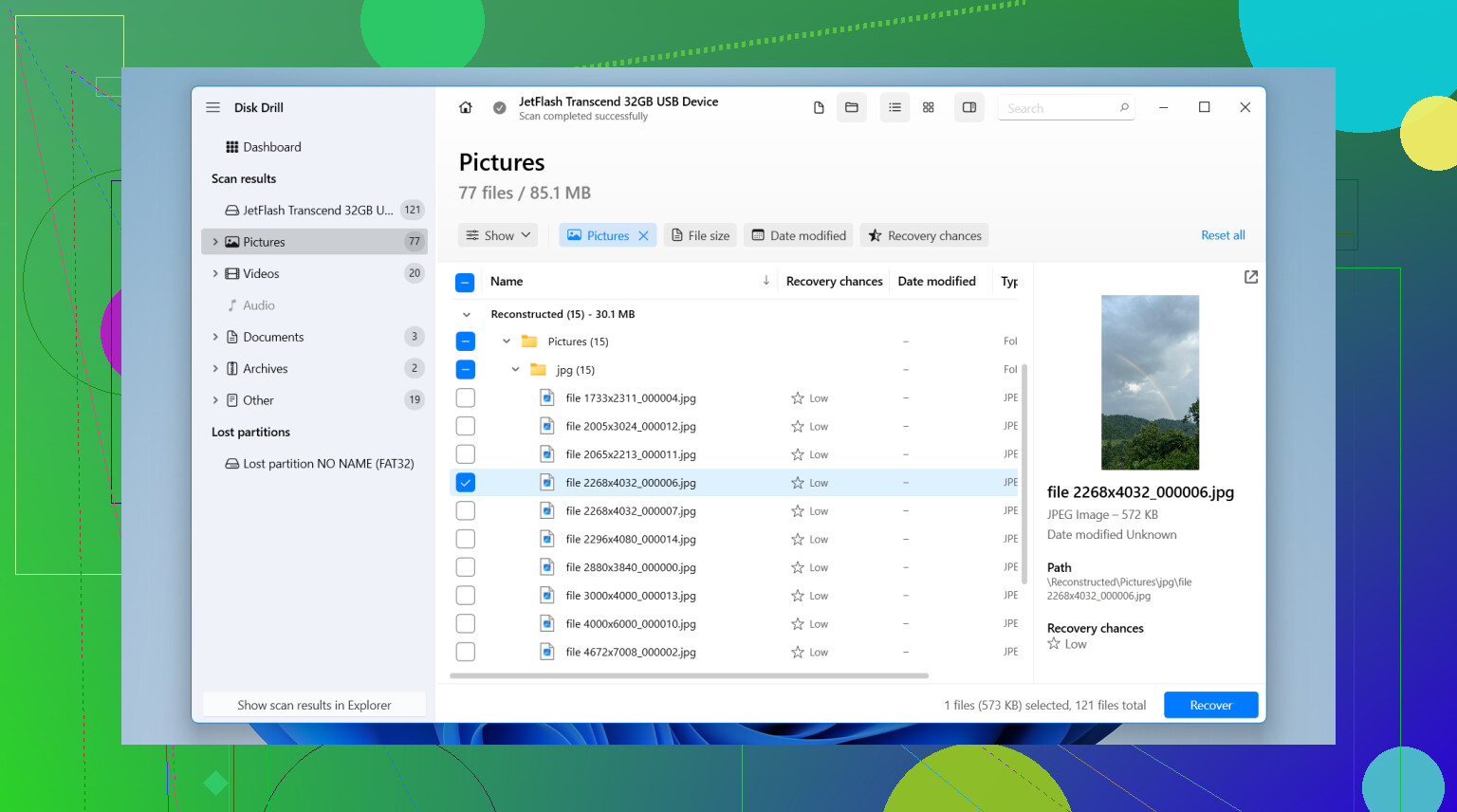
If you use Windows, I had decent luck starting with Disk Drill. The free limit is 100 MB. That is not much, though for a few JPEGs it might be enough. It also helps as a quick check, you scan the card and see if the Nikon shots still show up before you spend anything.
What I did:
- Took the SD card out of the camera and put it in a card reader.
- Installed Disk Drill on my PC, never on the card itself.
- Opened it, picked the SD card, then hit Search for lost data.
- Used Universal Scan. For plain deletion cases, it usually makes the most sense.
- Waited for the scan to finish, then checked previews first.
- Marked the files I wanted and clicked Recover.
- Saved everything to the computer, not back onto the same SD card.
If your missing files go past 100 MB and you want a no-cost route, PhotoRec is the usual answer. It works. I mean, it looks rough and feels old, but people recover photos with it all the time. The tradeoff is annoying stuff, no preview, ugly interface, and recovered files often come back with messed up names and no folder layout. Still usable, still free.
One thing people miss with Nikon stuff, if your camera was shooting RAW, so NEF files, check tool support before you waste time. Some free apps do fine with JPEGs and then fall apart on RAW.
I would also check the obvious before running recovery. If you import photos often, use SnapBridge, or sync to cloud storage, your files might already be sitting somewhere else. I found duplicates once on an old laptop folder and felt kinda dumb tbh.
The short version:
- Stop using the SD card.
- Use a card reader, not the camera over USB.
- Try Disk Drill first if 100 MB is enough.
- Use PhotoRec if you need a fully free option and do not mind a clunky setup.
If the card is damaged, unreadable, or keeps disconnecting, I would not push free tools at all. At that point you risk making it worse. A recovery shop costs more, yeah, but for important photos it beats poking at a dying card until it gives up.

9 Likes
Yes. If the card was only deleted or formatted, free photo recovery still works a lot of the time.
I agree with @mikeappsreviewer on the big rule. Stop using the Nikon SD card now. I do disagree on one small point though. I would not start with recovery first if the photos matter a lot. I would first make a full image of the card with a free tool like USB Image Tool or Win32 Disk Imager, then scan the image file instead of the card. Less wear, less risk if the card starts acting weird.
A safer order looks like this:
- Lock the SD card with the side switch.
- Put it in a card reader.
- Make a byte for byte image of the card to your PC.
- Run recovery on the image, not the origional card.
- Restore files to a different drive.
For free options, PhotoRec is still the no-pay workhorse. It finds JPEG and many Nikon NEF RAW files, but filenames come back ugly. If you want something easier to check first, Disk Drill is fine for previewing and small recoveries on Windows. The free cap is 100 MB, so it is more of a test pass unless your missing shots are few.
If your Nikon card shows errors, asks to format, or drops connection, stop there. DIY recovery gets risky fast.
For more community advice, this thread has solid photo recovery suggestions from Reddit users:
best Reddit photo recovery tips for deleted camera pictures
Yes, there is, but I’d add one thing to what @mikeappsreviewer and @sternenwanderer said: before you recover anything, check whether the photos are only “hidden” by Nikon’s folder structure getting weird. On Windows, enable hidden files and look through the DCIM folders manually. Sometimes deleted-looking shots are still there, esp after interrupted transfers.
If they’re truly gone, free options are basically:
- Windows File Recovery if you’re on Windows and don’t mind command line
- PhotoRec if you want fully free and can tolerate messy file names
- Disk Drill if you want the easiest scan/preview experience and only need up to 100 MB free on Windows
I slightly disagree with doing a bunch of retries with different tools on the actual card. One solid pass is fine, but constant rescanning can stress a flaky card. If the card acts even a little unstable, image it once, then work off that copy.
Also, if the photos were on a Nikon that saves both JPEG + NEF, sort recovered files by type afterward. People miss recovered RAWs because they only search for JPG.
One more thing, and this is boring but real: check Nikon transfer/cache folders on your computer if you’ve imported before. Deleted from card does not always mean lost everywhere.
If you want a simple overview of camera memory card recovery apps, this is a decent visual roundup:
best SD card recovery software for deleted photos
Main rule is still don’t write anything new to that card. That’s the part that kills recoveries fast.

One angle I’d add to what @sternenwanderer, @vrijheidsvogel, and @mikeappsreviewer said: check whether the card was used in a Nikon with dual-slot backup or with RAW to card 1 / JPEG to card 2. A lot of people think everything is gone from one SD card when half the shoot is actually sitting on the second one.
I also would not spend too long trying every free tool in existence. If the photos matter, too many scans can waste time and occasionally expose a weak card faster.
About Disk Drill:
Pros
- easy to use
- good preview support
- decent for quickly confirming whether photos are still recoverable
- can detect common Nikon JPEG and often NEF files
Cons
- free Windows recovery limit is only 100 MB
- not truly unlimited free recovery
- if the filesystem is badly damaged, results can be mixed
- recovered names/folders are not always perfect
My take: use Disk Drill as a quick “are the files still there?” checker, not as the whole strategy unless your deleted batch is tiny. If it shows recoverable previews, great. If the total is bigger than 100 MB, switch to a fully free option afterward.
Also worth checking: Lightroom imports, Windows Photos imports, Nikon NX Studio folders, and any old “copy all pictures” folders on your PC. Weirdly often, the recovery already happened months ago and people just forgot where the files landed.