I accidentally formatted my USB drive before copying off important photos and work documents, and now I need help figuring out if the files can still be recovered. I’m looking for the best USB data recovery steps or software to restore files from a formatted flash drive without making things worse.
This happened to me once with a thumb drive full of photos, and yeah, it felt awful.
What matters first is the type of format you ran.
If it was a Quick Format, your odds are still decent in a lot of cases. Quick Format usually clears the file system records, not the file contents themselves. So the data often sits there until something else writes over it.
If it was a Full Format, the situation is worse. A full format writes across the storage, so normal recovery software usually won’t get you much back, if anything.
One thing I had to learn the annoying way, there is no real ‘unformat’ button for a USB drive. Once the format happens, it happened. Recovery apps are not reversing the format. They scan the device, look for leftover file data, and try to rebuild files from what remains.
Most important step first, stop using the USB drive now.
Do not copy anything onto it.
Do not format it again.
Do not run CHKDSK or repair tools.
Every write lowers your chances, sometimes fast.
What I would do next is use a recovery app and scan the drive from another machine drive, not from the USB itself. I’ve had decent results with Disk Drill because it’s simple enough when you’re already stressed and trying not to make it worse.
Steps I’d follow:
- Install Disk Drill on your computer’s internal storage, never on the formatted USB.
- Plug in the flash drive.
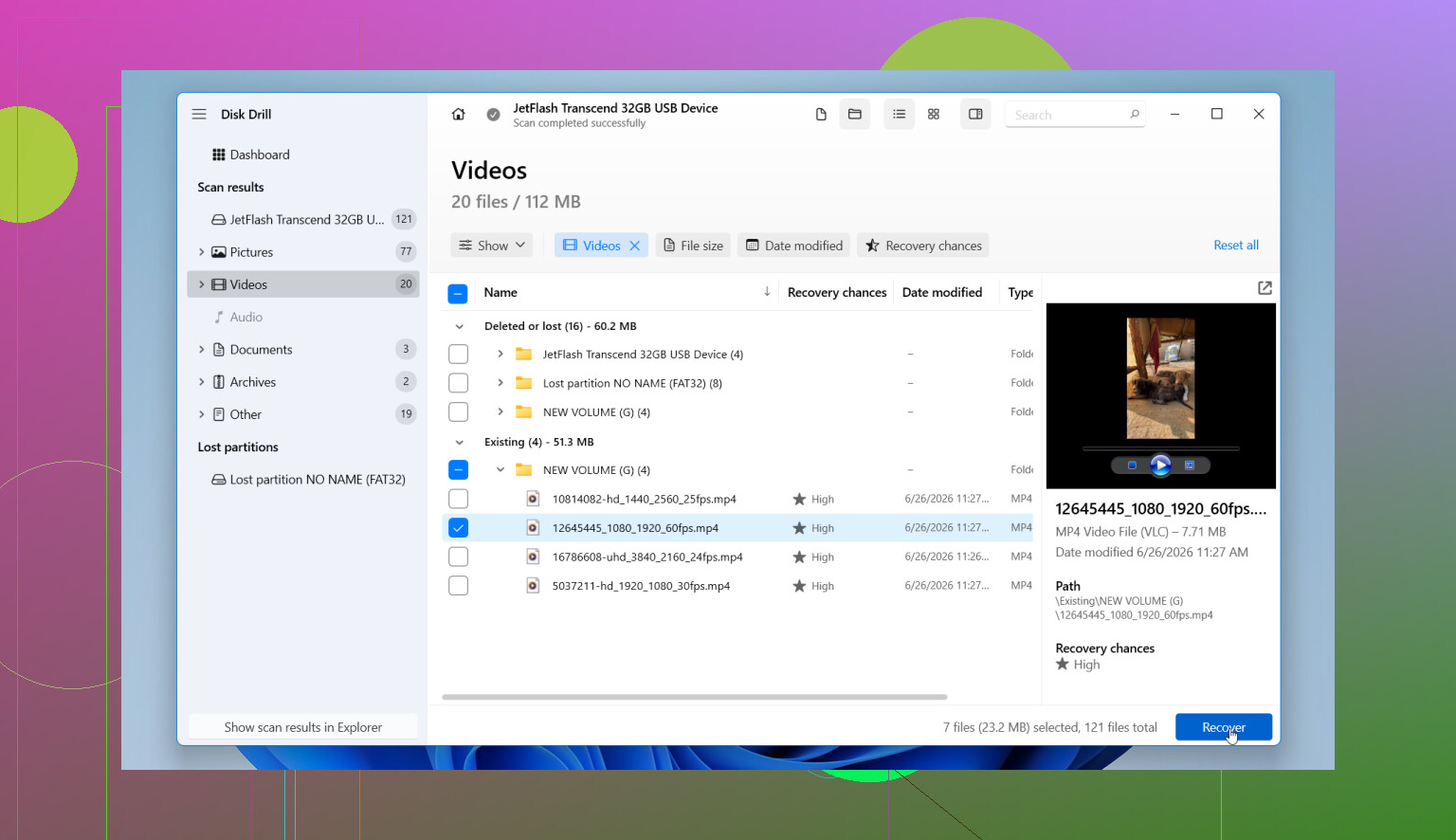
- Open Disk Drill and pick the USB from the device list.
- Hit Search for Lost Data, then pick Universal Scan when it asks.
- Let the scan run all the way. You can peek early, but I’d wait. I got better results doing tht.
- Preview anything important. If a file previews cleanly, your recovery odds for that file are usually better.
- Recover files to a different drive, not back onto the same USB.
One part people skip, and I wouldn’t, is the disk image option. Disk Drill can make a byte-for-byte image of the flash drive. If your USB is dropping connection, throwing read errors, or acting flaky, image it first and scan the image instead. I did this once on a dying stick and it saved me from having to keep reconnecting the thing.
If recovered files come back with weird names, broken folder structure, or random sorting, that’s normal after formatting. What matters is whether the file data opens.
So yes, recovery after formatting is often possible, mostly after a Quick Format. The best move is simple. Leave the drive alone, scan it soon, and restore recovered files somewhere else.
11 Likes
Stop writing to the USB. That part from @mikeappsreviewer is dead on.
I disagree a bit on full format, though. On older USB sticks, or if Windows did a format without heavy overwrite behavior, some file carving still works. Folder names usually won’t survvive, but photos and docs sometimes do.
What I’d do:
- Check the USB’s size in Disk Management. If it shows the right capacity, recovery odds are better than if the controller is failing.
- If the drive disconnects, gets hot, or reads as 0 bytes, skip DIY and go to a lab.
- If it stays stable, run a deep scan with Disk Drill or another tool with file signature scanning.
- Sort results by file type first, JPG, PNG, DOCX, PDF.
- Recover the most important files first to your PC or another external drive.
For photos, file carving works well because JPEG files have clear headers. For Office docs, results are mixed. A DOCX is a ZIP container, so partial damage often breaks it.
If you want the best software for formatted USB recovery, Disk Drill is one of the easier options for a quick scan plus deep scan workflow. Also worth reading this formatted USB recovery walkthrough.
If nothing previews cleanly, stop. More rescans won’t fix overwritten data. That’s the hard part, but it saves time.
One thing I’d add to what @mikeappsreviewer and @viaggiatoresolare said: before you even scan, check whether the USB is using flash memory with TRIM-like cleanup behavior. On many plain USB sticks, deleted/formatted data can linger. On some newer devices, cleanup happens faster than people expect. So time matters, but panicking and running 6 different tools back to back can actually make things messier.
Also, I slightly disagree with the “just keep rescanning with different apps” mentality people sometimes fall into. If one solid deep scan shows nothing previewable, the issue is often overwrite damage or hardware trouble, not “wrong button syndrome.”
What I’d do:
- Plug it in and confirm it shows the correct size
- If it makes Windows hang, disconnects, or asks to be formatted again, stop messing with it
- If it’s stable, create an image first if possible
- Then scan the image, not the original device
Disk Drill is a decent pick here because it can handle both imaging and recovery in one place, which is less confusing when you’re already annoyed and sleep-deprived. For photos especially, preview matters more than filenames.
If the files are business-critical, don’t DIY for too long. Every extra test is a gamble, tbh.
For a solid step-by-step guide on recovering lost files after formatting a flash drive, this may help:
how to recover files from a formatted USB flash drive
Short version: stop using the drive, image it if you can, scan with something like Disk Drill, recover to another disk, and if the USB acts weird, skip straight to a pro lab.
Small disagreement with @andarilhonoturno on one point: a “full format = zero chance” rule is too absolute. On some USB sticks and some Windows format cases, I’ve still seen partial raw recovery, just usually without filenames or folders.
What I’d add that the others didn’t stress enough is this: check the recovered files with a hex preview or normal preview before paying for anything or wasting hours sorting junk. If JPEGs preview, great. If DOCX/PDF files recover but won’t open, they may be structurally damaged even if the size looks right.
Also, if the USB is tiny and old, sometimes the controller lies less than modern flaky sticks. If capacity suddenly looks wrong, recovery software is not the real problem.
Disk Drill is fine here because it keeps imaging, scanning, previewing, and recovery in one workflow.
Pros:
- easy UI
- good preview support
- can scan disk images
Cons:
- deep scans can return lots of messy, renamed files
- Office document recovery after format is hit or miss
- license cost may not be worth it for low-value data
Compared with points from @viaggiatoresolare and @mikeappsreviewer, I’d say the real decision tree is: stable drive, try DIY once properly; unstable drive, stop and escalate. If your files are irreplaceable, don’t turn a recoverable case into an overwrite case by experimenting too long.