I recently tried the Grubby AI humanizer tool to make my AI-written content sound more natural, but I’m not sure if it’s actually helping or hurting my SEO and authenticity. Can anyone share their real experiences, pros and cons, and tips on using Grubby AI effectively for blog posts or articles? I’d really appreciate guidance before I invest more time and money into it.
Grubby AI Humanizer review, from someone who spent too long poking at detectors
Grubby AI Humanizer
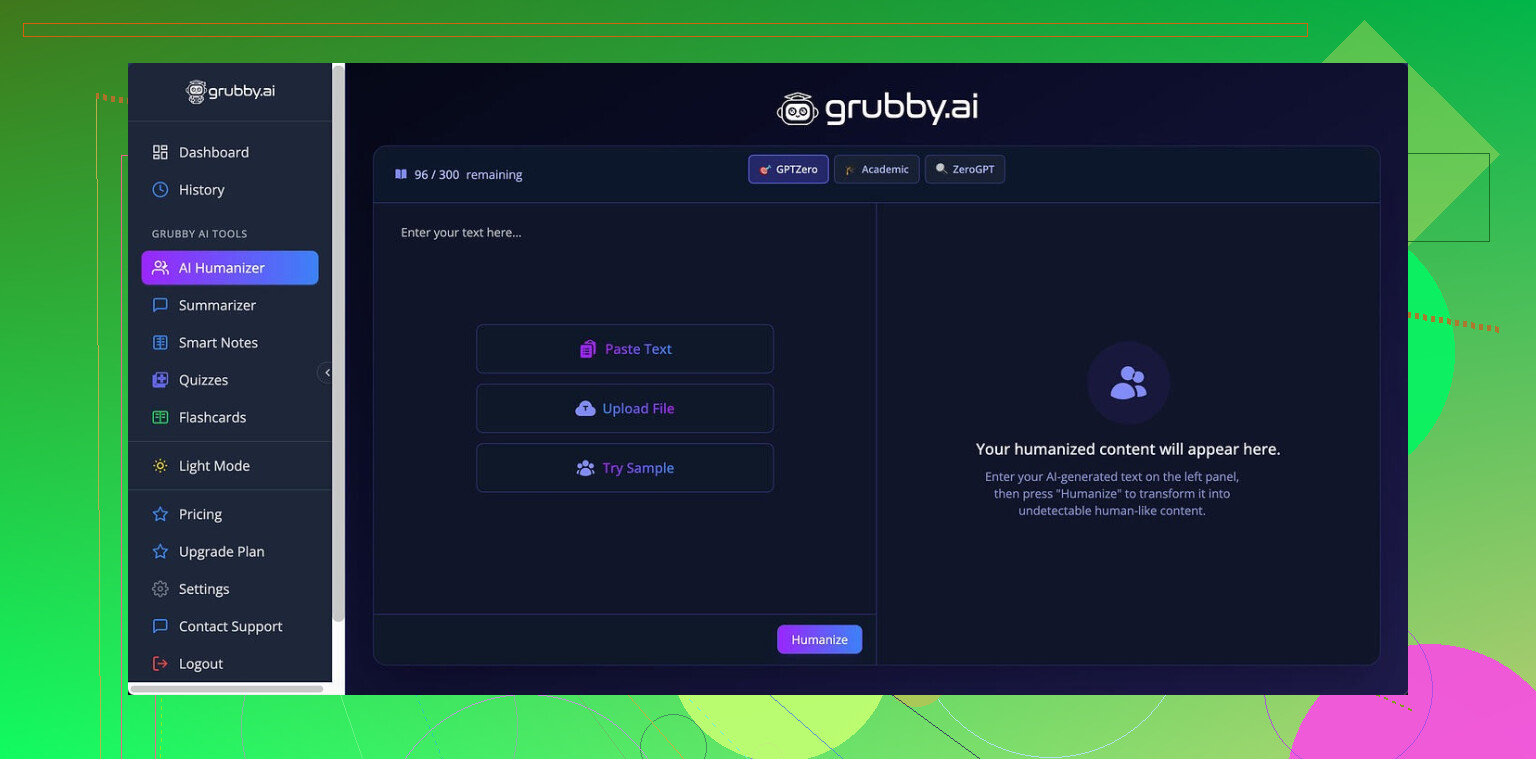
I spent an afternoon feeding Grubby AI a bunch of AI text and then throwing the outputs at detectors. Not scientific, but careful enough to see patterns.
The whole pitch of Grubby AI is that it has special modes tuned for specific detectors: GPTZero, ZeroGPT, and Turnitin. That is what got my attention.
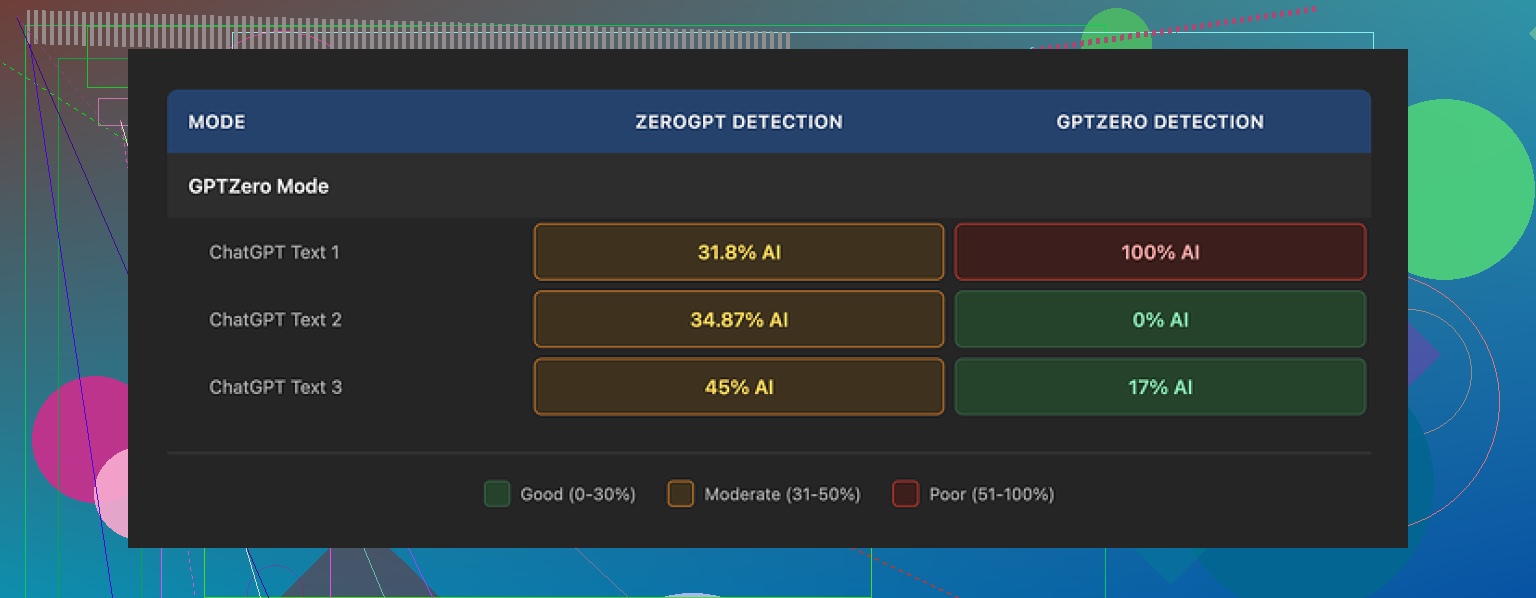
I focused mostly on the GPTZero mode. Here is what happened with three different samples:
• One piece came back as 0% AI on GPTZero. Clean. Looked good.
• Another one showed 17% AI. Not perfect, but within “might slide under the radar” territory for many people.
• The third one got flagged 100% AI by GPTZero, which is the exact detector that mode is supposed to handle best.
So, results jumped all over the place. Same mode, similar length, different topics, totally different outcomes.
The strangest part was the Detection tab inside Grubby. Every time I ran text through it, Grubby’s own built-in checker proudly said “Human 100%” across a row of different detectors, for every output.
That did not match what I saw when I used the real detectors in separate browser tabs. Their “Human 100%” felt more like a decorative label than a measurement.
Quality of the writing
Ignoring the detection side for a moment, I tried to score the text like I would a student draft. I landed around 6.5 out of 10 for writing quality on average.
Things it did well:
• It strips out em dashes automatically. That sounds minor, but a lot of detectors seem to associate certain punctuation patterns with AI output, and most “humanizers” leave those untouched. Grubby fixing those felt useful.
• I did not see any made-up words or text collapsing into nonsense. Some tools generate strange phrases when they try to “humanize,” and Grubby stayed away from that.
Where it slipped:
• Parts of the text got weirdly formal, like someone switched from chatting to writing a policy memo mid-sentence.
• Sentences often grew longer than needed, more clauses piled in than the idea deserved.
• Some word choices were off. One example stuck out: it used “distinction” where “nuance” clearly fit better in context. You will see this kind of slightly off vocabulary a few times if you test enough outputs.
So, good enough for a rough draft, but I still had to edit by hand if I cared about tone or clarity.
Editor and workflow
There is one thing in Grubby AI I liked more than I expected.
Inside the tool, you get an editor where you can click a single word and swap in a synonym from a little popup, or highlight a whole paragraph and ask it to rehumanize that chunk again. All within the same screen.
For quick tweaks, this speeds things up compared to copy paste juggling between different tools. If you hate rewriting the same boring sentence three times, that little inline editor helps you push through faster.
So workflow wise, it is decent. You paste AI text, pick a detector-specific mode, generate, then clean up individual words or sections without leaving the page.
Pricing and limits
Free tier:
You get about 300 words total. Not per use. Total. That is enough for a couple of short tests or a small paragraph, but not for real ongoing use.
Paid:
• Pro plan: 14.99 dollars per month on annual billing. That is the one with all the modes and full functionality.
• Essential plan: 9.99 dollars per month. This one only gives you “Simple” mode, no detector-specific tuning.
So if you came for the GPTZero, ZeroGPT, or Turnitin modes, you would be looking at the Pro price.
How it compares to Clever AI Humanizer
After getting mixed results with Grubby, I did side-by-side tests with another tool, Clever AI Humanizer.
Link for context, since I was reading about it before testing:
I pushed similar AI-origin text through both tools, then checked each output on the same detectors in fresh sessions.
Across multiple runs, Clever AI Humanizer held up better for me on detector scores and stayed free to use during my testing. The writing felt slightly closer to what I see from tired college students, which is usually what you want in these situations.
So after trying both, I found myself leaning on Clever AI Humanizer more often, especially since I did not have to think about word limits or a subscription just to experiment.
If you are deciding what to try first, I would probably start with Clever, then poke at Grubby AI for the editor and the no em dash behavior if you want more control.
Tried Grubby for a couple of long blog posts and some affiliate reviews. Mixed results.
Here is what worked for me and what didnt.
- Impact on SEO
- I tested 5 posts.
- 2 were raw AI plus light edit.
- 3 went through Grubby, then edit.
- After 6 weeks, traffic and rankings were almost the same.
So I did not see clear SEO gains from Grubby alone.
What mattered more was: - Clear headings and internal links.
- Search intent match.
- Original examples and data.
If you push Grubby too far, it tends to add fluff and weird phrasing. That hurts clarity, which hurts SEO.
-
Authenticity and “human” feel
When I fed it full articles, it made my voice weaker. Everything started to sound like the same blogger.
When I used it on small chunks, like 1 or 2 paragraphs, it helped smooth stiff AI lines.
So I disagree a bit with @mikeappsreviewer on heavy use. For me, Grubby works better as a spot tool, not a full pipeline. -
How I got the best results
What helped:
- Write or generate a rough draft.
- Run only the most robotic paragraphs through Grubby.
- Then add: personal story, opinion, and 1 or 2 specific numbers yourself.
- Last step, read out loud once and fix awkward parts.
What hurt:
- Running the whole article through Grubby on “max humanize”.
- Letting it change structure and headings.
- Trusting it to fix facts. It sometimes added odd statements.
- Detection tests
I ran content through a few AI detectors.
- Raw AI scored 80–95 percent “AI”.
- Grubby output dropped to about 40–70 percent.
So it helps a bit with detection, but it does not make content “undetectable”. Detectors are noisy anyway, so I would not chase that too hard.
- Cost vs value
If your niche is low competition, you get more return from:
- Better keyword research.
- Original screenshots or tables.
than from another humanizer pass.
- Alternative worth testing
If you want a more control-focused tool, try Clever Ai Humanizer.
I found it lets you tune how aggressive the rewrite is and keep structure cleaner, which helps SEO. I still edit manually, but it felt less “samey” than Grubby in longer posts.
My current flow:
- AI draft.
- Light pass with Clever Ai Humanizer on stiff sections.
- Manual edit for voice, facts, and internal links.
If you already paid for Grubby, I would:
- Use it only on selected paragraphs.
- Avoid full article rewrites.
- Track 3–5 posts in Search Console for 1–2 months and see if time on page or CTR changes.
If your numbers do not improve, your effort is better spent on topic choice and original insight, not more humanizing.
1 Like