Photos I shot on my camera were visible at first, but then they suddenly disappeared from the CF card and I can’t find them on the camera or my computer. I’m looking for help with CF card photo recovery before I do anything that could overwrite the files, since these pictures are important and I really need to get them back.
I had this happen on a CF card once, and the first thing I learned was simple. Don’t do anything else with the card yet. If your computer still sees it, your odds are still decent.
What messes people up is panic. They pop the card back into the camera, take a couple test shots, run some repair tool, copy random stuff over, and then wonder why recovery got worse. When files vanish from a CF card, the card often only lost the map to the files. The data itself might still be there. The moment you write new stuff onto it, you start crushing the old bits you wanted back.
So, if this were my card, I’d do this first.
Take the CF card out of the camera.
Leave it out. No more photos, no formatting, no repair attempts.
Plug it into your computer with a proper CF reader.
Install Disk Drill on your computer, not onto the card.
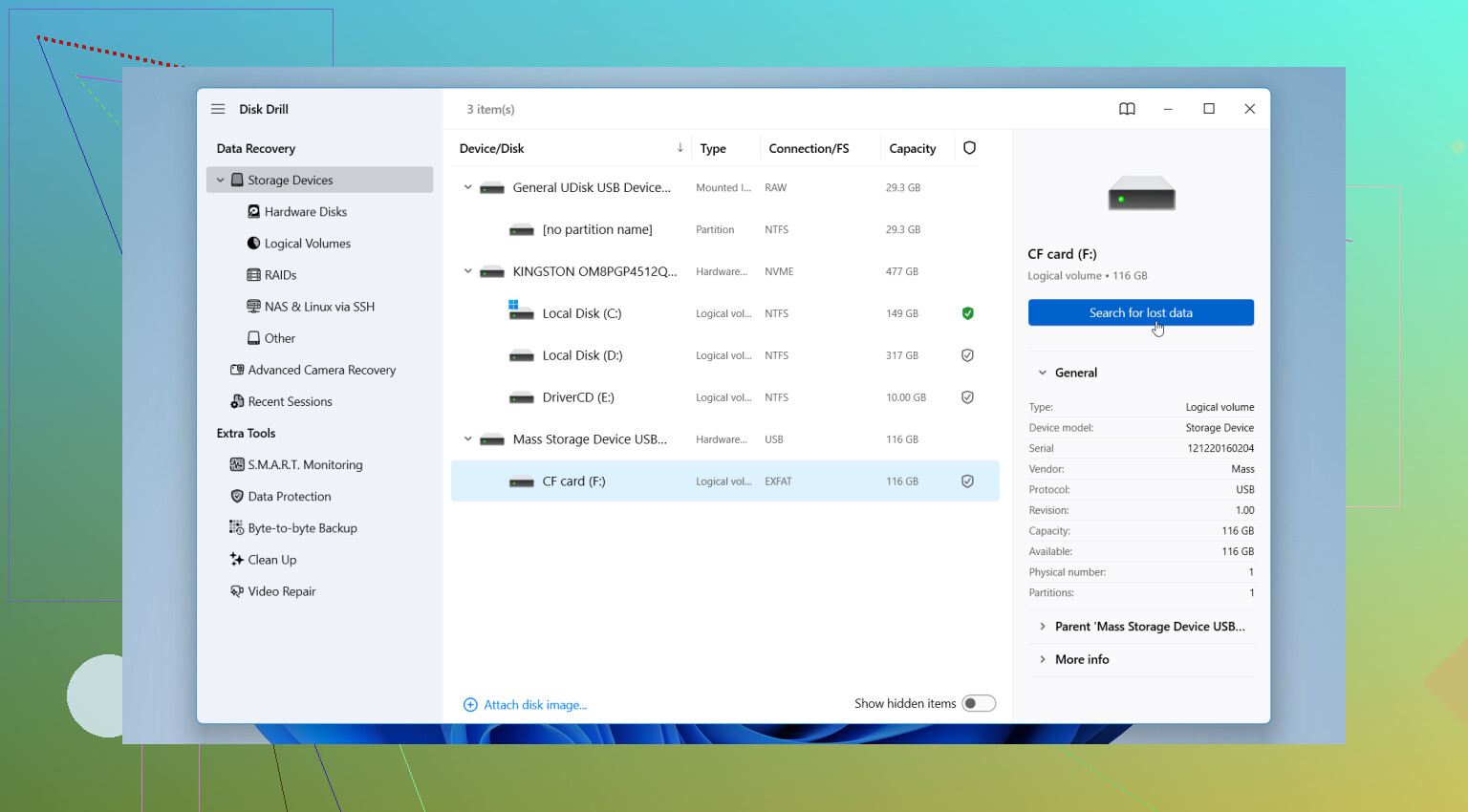
Open it and pick the CF card from the device list.
Run the full scan, not the quick one if the files matter.
Wait. On bigger cards this can drag a bit.
Check the preview for your photos, videos, or docs.
Select what you want back.
Save the recovered files to your computer or a different external drive.
And yeah, this part matters more than people think. Do not recover back onto the same CF card. I did that once years ago with a different card type, and it was a dumb mistake. You overwrite missing files before you even know what was still recoverable.
If you want the short version, Disk Drill is the one I’d try first for a normal case like this. It handles FAT32 and exFAT cards well enough, supports common camera formats, and it reads RAW files from the usual brands like Canon and Nikon. The preview tool saves time too. If the preview looks good, your chances usually feel better right away.
There are other options if you don’t want to stick with one tool. This list is decent: data recovery software.
My rough take on the common picks:
PhotoRec, free, ugly, works more often than its interface suggests. Downside, filenames and folder structure often come back as a mess.
R-Studio, strong tool, more control, steeper learning curve. I wouldn’t hand it to someone who only wants family photos back tonight.
Disk Drill, easier to work through, less friction, good fit when you want results without reading a manual for an hour.
There’s also a point where I’d stop trying software and send it out. If the CF card is not detected on any machine, if the pins are bent, if it gets hot, if it keeps dropping connection, or if the files are irreplaceable, I wouldn’t push my luck. A recovery lab costs more, yeah, but physical damage is a different problem. Software won’t fix failing hardware.
So the triage is pretty plain:
If the card is detected and stable, try recovery software.
If the card is invisible, damaged, or acting weird, go to a recovery service.
That’s the fork in the road.

8 Likes
What you describe sounds less like the photos got erased and more like the card index went bad. Cameras read the file table first. If the table breaks, images vanish in-camera even when the image data is still on the CF card.
I agree with @mikeappsreviewer on one big point. Keep the card out of the camera. I slightly disagree on jumping straight into one scan type first. On CF cards, I like checking the card health and making an image of it before I trust any recovery pass. If the card starts throwing read errors, each extra scan hurts your odds a bit.
My order would be:
- Test the CF card in a different reader.
- If it mounts, copy a full image of the card to your computer with a tool made for byte-to-byte backup.
- Run recovery against the image, not the original card.
- Try Disk Drill first if you want an easier interface and photo preview.
- If filenames and folders matter less than raw recovery, PhotoRec is still worth a shot.
- If the card disconnects, freezes Explorer, or reads at crazy slow speed, stop there.
A few camera-specific things people miss:
- Some cameras create hidden sidecar files and odd folder structures. Your photos might still exist in DCIM but your computer is filtering or choking on the directory.
- If you shot RAW plus JPEG, one format may show up while the other looks gone.
- exFAT corruption on removable media is common after battery pull, card ejection, or camera lockup.
Disk Drill is a solid CF card photo recovery option because it previews RAW formats well and keeps the process simple. If you want a quick explainer on choosing the right memory card recovery app, this is decent: watch this memory card recovery software overview
If the card has bent pins, gets hot, or vanishes during reads, stop messing with it. That’s lab territory. DIY softwre recovery is for stable cards, not failing hardware.
What I’d add to @mikeappsreviewer and @sterrenkijker is this: before you even think recovery software, check whether the photos are actually being hidden by a busted folder structure rather than fully “missing.”
A weird CF card corruption can leave the image files there but make the DCIM folders unreadable, empty, or renamed into garbage. On Windows, turn on hidden files and check the card for weirdly named folders or files with the right size but wrong extension. I’ve seen JPGs come back just by copying them off manually and renaming them. It sounds dumb, but it happens.
Also, I would not run CHKDSK on the card right now. A lot of people do that because the system suggests it, and sometimes it “fixes” the file system by deleting the breadcrumbs you needed for photo recovery. That advice gets handed out way too fast.
If the card is readable and stable, Disk Drill is a pretty reasonable choice for CF card photo recovery because it can preview what’s actually recoverable before you commit. That matters. If you see your RAWs or JPGs in preview, that tells you a lot. If preview is broken or only fragments show, the damage may be worse than it first looked.
One more thing people skip: check the camera setting you used. RAW, JPEG, RAW+JPEG, dual-slot backup if your camera has it, and whether the camera maybe wrote to internal memory or another card. Sounds obvious, but panic makes ppl miss obvious stuff.
If you want another explainer that’s easy to skim, this is relevant: CF card photo recovery discussion and software tips
Short version:
- don’t use the CF card again
- don’t repair it yet
- don’t run CHKDSK
- check for hidden or misnamed files
- if stable, scan with Disk Drill
- if unstable, stop messing with it
That last part is the big one. A flaky CF card can go from “recoverable” to “toast” realy fast.
One small disagreement with @sterrenkijker, @himmelsjager, and @mikeappsreviewer: if the card mounts cleanly and copies at normal speed, I would browse it with a hex-safe file manager first before launching recovery. Sometimes the JPEG/CR2/NEF files are still there but the camera just lost the folder flagging, so a blind recovery scan is unnecessary.
What I would check that hasn’t been stressed enough:
- Compare used space vs free space on the CF card. If the card still shows most of the space as occupied, your photos probably still exist somewhere.
- Look for folders beyond DCIM. Some cameras stash clips, sidecars, or overflow files in vendor-specific directories.
- Try a Linux machine or live USB if Windows acts weird. Windows sometimes refuses a messy card that Linux will still read.
- If the card has a physical issue with the CF pin interface, stop. CF is notorious for connector trouble.
About Disk Drill for CF card photo recovery:
Pros
- easy preview for JPG and many RAW formats
- simple enough for non-technical users
- decent results on damaged file systems
Cons
- not the cheapest route if you need full recovery
- deep scans can dump files into generic type-based folders
- on badly corrupted media, it is not as surgical as heavier tools
So my order would be: inspect capacity, try alternate OS/reader, manually search for intact files, then use Disk Drill if the file system is clearly broken. If the card reads inconsistently, skip software roulette and go straight to imaging or a lab.