I accidentally deleted important photos from my Canon camera before backing them up, and I’m trying to find the best software to recover them. The pictures are really important, and I need help choosing a safe, reliable Canon photo recovery tool that actually works.
Yeah, there’s still a decent shot your photos are sitting on the Canon card. What I’d do first is stop using the card right now. No test shots. No quick clips. Don’t poke around the camera more than you need to. If the camera or your computer asks to format it, ignore that.
When photos get deleted on a Canon camera, the files usually aren’t wiped off the SD card on the spot. In a lot of cases, the camera only clears the file listing. The photo data stays there until new data lands on top of it. Once that happens, recovery gets uglier fast.
Pull the SD card out of the camera. If it’s a standard SD card with the little side switch, slide it to lock. That won’t bring files back by itself, I know, but it cuts down the odds of accidental writes while you’re trying to recover stuff.
Next, plug the card into a computer with a card reader. I’ve had better luck doing it this way than hooking up the camera over USB. A reader tends to give recovery apps cleaner access to the card. Also, don’t write anything to the card and don’t run repair tools first. Skip CHKDSK on Windows. Skip First Aid on Mac. Those tools aim to fix file system issues, not pull deleted images back, and I’ve seen them make recovery harder.
For recovery, use software built for deleted files and photos. Disk Drill is one option worth trying here. It handles common Canon image types, including RAW, and the preview feature helps a lot. If a file previews fine, you’ve got a better idea it’s intact before you spend time recovering a pile of broken names with no clue what’s inside.
Here’s the process I’d follow:
- Install the recovery app on your computer, not on the SD card.
- Put the Canon SD card in a card reader.
- Open the app and pick the SD card.
- Start a full or universal scan.
- Check the deleted or lost files section.
- Narrow results to photos or RAW formats.
- Preview anything you care about.
- Recover the files to your computer or a different drive, never back onto the same card.
Before you assume the card is the only place left, check the dull stuff too. I’ve found missing photos in those places more than once. Look in Recycle Bin if you’re on Windows. Look in Trash on Mac. If you had backups or sync turned on, check File History, Time Machine, Google Drive, iCloud, OneDrive, and Canon’s image.canon service. Sometimes the SD copy is gone and a synced copy is still sitting there.
Your odds are better if the deletion happened recently and the card hasn’t been used since. If you kept shooting after deleting the photos, some of the old files might be partly overwritten, or gone for good. So the short version is this: stop using the card, scan it with recovery software, preview what’s recoverable, and save the results somewhere else.
And yeah, after a scare like this, I’d stop trusting that card for the rest of the day. SD cards love picking the worst timing posssible.
12 Likes
I’d look at Disk Drill first. It has a solid record with SD cards, deleted JPEGs, and Canon RAW files like CR2 and CR3. Preview matters. If the app shows a clean preview, your odds are better. That saves time.
I agree with @mikeappsreviewer on using a card reader. I disagree a bit on going straight for the biggest scan every time. Start with a normal deleted-file scan if the card mounts fine. It’s faster. If it finds little or nothing, then run the deep scan. Less wear, less waiting.
A few practical points:
Install the software on your computer, not the SD card.
Recover files to your SSD or another drive.
Sort results by file type and date. Canon folders often make the mess worse.
If names are gone, focus on previews and file size. A full-res Canon photo usually won’t be tiny.
If the card shows errors or disconnects, make a byte-for-byte image first, then scan the image. R-Photo or PhotoRec are decent backup options if Disk Drill misses stuff, but they’re less friendly.
If your goal is how to recover deleted photos from a camera SD card, this short guide helps too, watch this camera SD card photo recovery walkthrough.
If the photos were deleted and you kept shooting, some files are gone. No software fixes overwritten data. That part sucks, but it’s true.
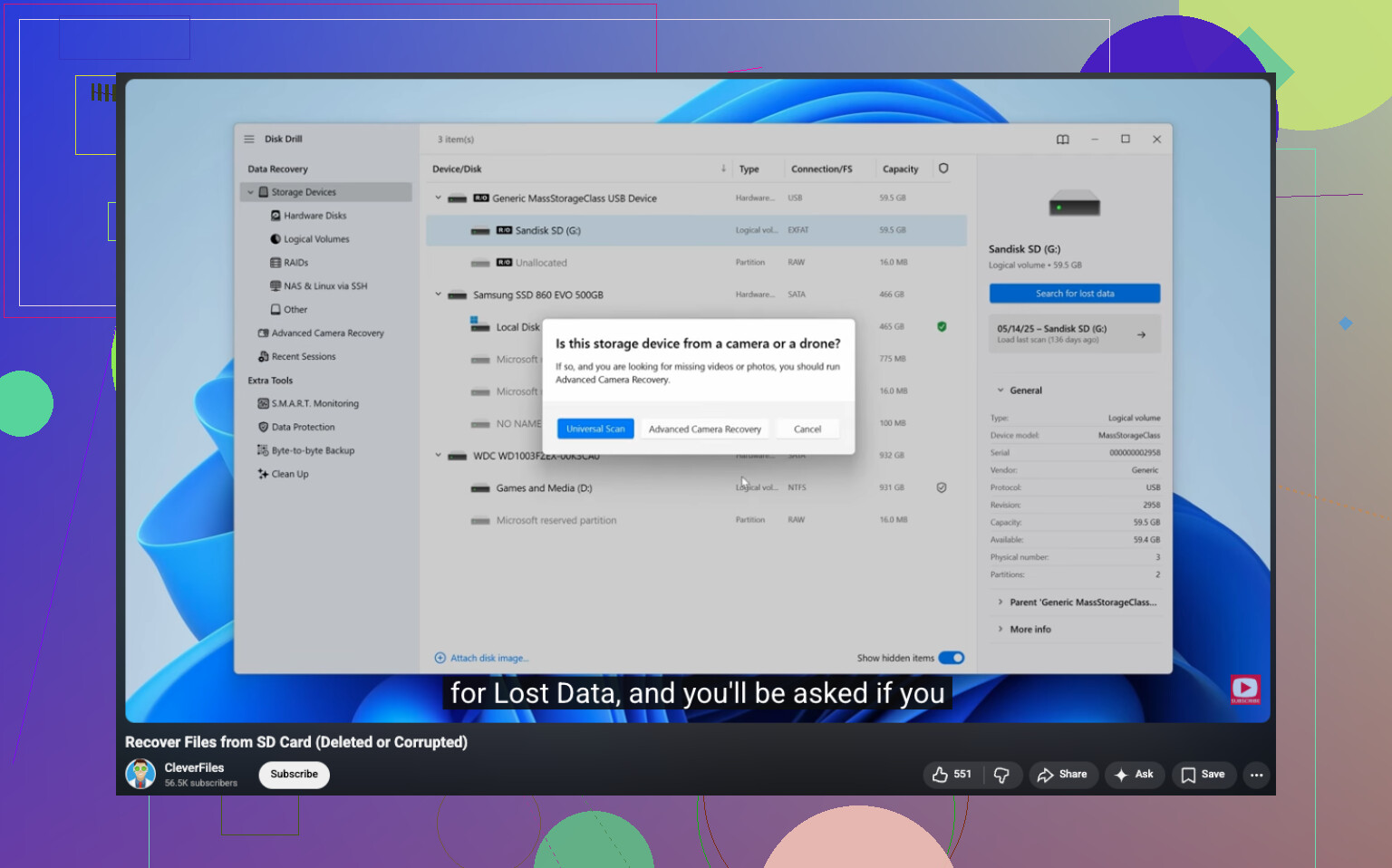
I’d add one thing neither @mikeappsreviewer nor @suenodelbosque really leaned on enough: if these photos are that important, consider making an image backup of the entire SD card before you do any recovery attempts. Not everybody bothers, but it gives you one clean shot to work from if the card is flaky. If the card is healthy, sure, scan it directly. If it’s acting weird, don’t keep hammering it.
As for software, Disk Drill is a solid pick for Canon photo recovery because it handles JPEG plus Canon RAW formats well and the interface is way less annoying than some of the older recovery tools. I don’t totally agree that you always need to jump between a bunch of apps right away. Usually one decent tool first is smarter, then try alternatives only if results are bad.
One more thing people forget: if your Canon has dual card slots, or if you previously imported through Canon software, check for hidden local copies and cache folders. I’ve seen “lost” photos turn up there. Sounds dumb, but it happens.
If the deleted shots were super valuable like paid work, legal stuff, wedding pics, etc, and the card has been reused even a little, a pro recovery lab may be worth more than DIY attempts. Expensive, yeah, but sometimes that’s the move.
Also, this is a useful read if you want more info on Canon/SD card recovery cases: real-world discussion on recovering deleted photos from a Canon SD card
Short version: Disk Drill first, recover to another drive, and if the card is unstable, clone it before you do anything else. Thats probly the safest route.

I’d be a little more cautious than @mikeappsreviewer on one point: if the card is mounting normally and you only deleted photos, recovery software is usually the right first move, but if the card suddenly looks empty, asks to format, or throws I/O errors, stop there and image the card first. That part matters more than people think.
For software, Disk Drill is a strong choice for Canon cards because it tends to do well with JPG plus Canon RAW formats like CR2 and CR3, and the preview system is actually useful instead of being cosmetic.
Pros of Disk Drill
- Easy to sort by photo type and size
- Good preview support for many image files
- Handles SD cards and Canon RAW reasonably well
- Cleaner interface than PhotoRec-style tools
Cons
- Not the cheapest option if you need full recovery
- Deep scans can return messy filenames
- On damaged cards, it’s not magic. Cloning first is still safer
I partly agree with @suenodelbosque and @hoshikuzu: using a card reader and saving recovered files elsewhere is non-negotiable. Where I differ is that I would not keep bouncing between five apps right away. Try one solid tool first, evaluate previews, then move to R-Photo or PhotoRec only if needed.
One extra thing people miss: check whether the camera had Wi-Fi transfer enabled or whether Canon import software already pulled copies to your computer. Sometimes the “deleted” photos are only missing from the card, not from the machine you imported with.